Introduction to 3D Printing
3D printing, also known as additive manufacturing, is a revolutionary process that builds three-dimensional objects layer by layer from a digital design. Unlike traditional manufacturing, which often involves removing material (subtractive manufacturing), 3D printing adds material only where needed. This allows for complex geometries, customized designs, and rapid prototyping. Printie 3D has been at the forefront of this technology in Jordan since 2012, offering a wide range of 3D printing services.
Types of 3D Printing Technologies
Several 3D printing technologies exist, each with its own strengths and weaknesses. Here's an overview of some common methods:
Fused Deposition Modeling (FDM)
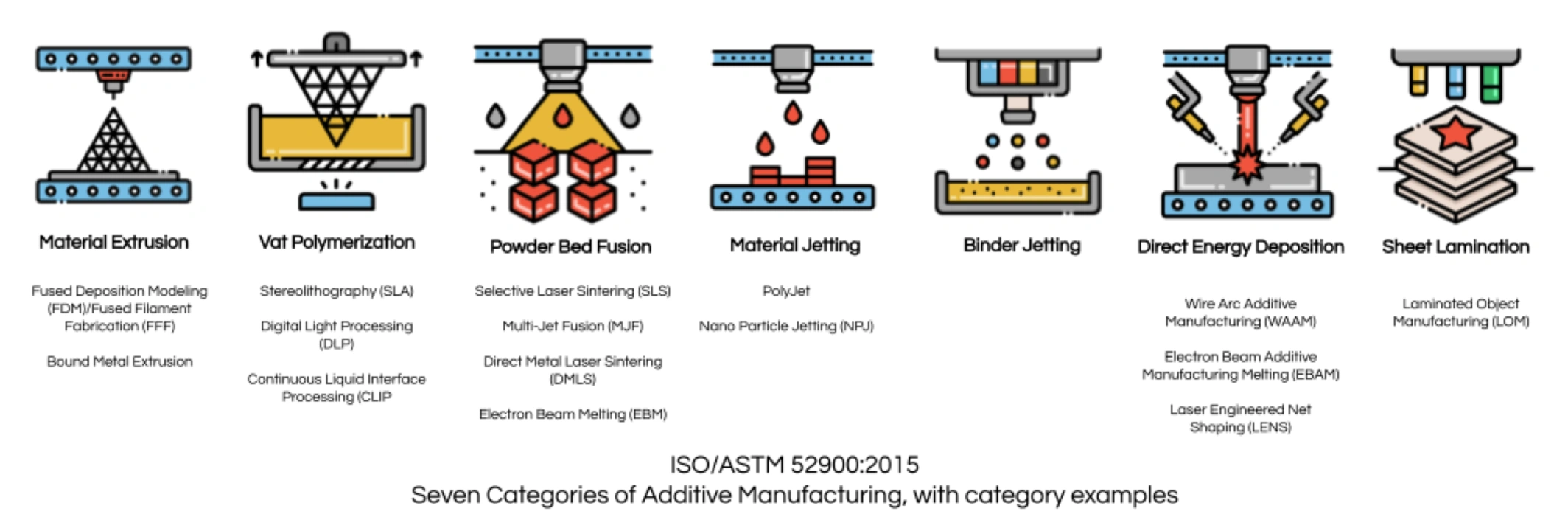
FDM is the most widely used 3D printing technology, especially for beginners. It involves extruding a thermoplastic filament through a heated nozzle and depositing it layer by layer onto a build platform. FDM 3D printing is cost-effective and suitable for a wide range of applications.
- Pros: Affordable, easy to use, wide range of materials.
- Cons: Lower resolution compared to other technologies, visible layer lines.
- Materials: PLA, ABS, PETG, TPU, ASA.
Stereolithography (SLA) and Digital Light Processing (DLP)
SLA and DLP are resin-based 3D printing technologies that use a light source to cure liquid resin layer by layer. SLA uses a laser, while DLP uses a projector. These technologies offer high resolution and smooth surface finishes. Learn more about resin 3D printing techniques.
- Pros: High resolution, smooth surface finish, intricate details.
- Cons: More expensive than FDM, limited material options, requires post-processing.
- Materials: Various photopolymers (resins).
Selective Laser Sintering (SLS) and Selective Laser Melting (SLM)
SLS and SLM are powder-based 3D printing technologies that use a laser to fuse powder particles together. SLS is used for polymers, while SLM is used for metals. These technologies can produce strong, functional parts without the need for support structures.
- Pros: Strong and durable parts, complex geometries, no support structures needed.
- Cons: High cost, limited material options, requires specialized equipment.
- Materials: Nylon, aluminum, titanium.
Essential Equipment & Software
3D Printer Selection
Choosing the right 3D printer is crucial for a successful 3D printing experience. Consider these factors:
- Budget: 3D printers range in price from a few hundred to several thousand dollars.
- Build Volume: The maximum size of the objects you can print.
- Print Quality: Resolution and accuracy of the printer.
- Materials: The types of filaments or resins the printer can use.
- Ease of Use: How easy the printer is to set up, operate, and maintain.
Printie 3D offers a selection of professional 3D printers to suit various needs.
CAD Software
CAD (Computer-Aided Design) software is used to create or modify 3D models. Some popular options for beginners include:
- Tinkercad: A free, browser-based CAD software that is easy to learn.
- Fusion 360: A professional-grade CAD software that is free for personal use.
- Blender: A free and open-source 3D creation suite suitable for artistic and complex modeling.
The output from CAD software is typically an STL (Stereolithography) file, which represents the surface geometry of the 3D model using triangles.
Slicing Software
Slicing software converts the STL file into G-code, which is the language that 3D printers understand. The slicer divides the 3D model into layers and generates instructions for the printer to follow. Popular slicing software includes:
- Cura: A free and open-source slicer with a user-friendly interface.
- PrusaSlicer: Another free and open-source slicer with advanced features.
- Bambu Studio: A user-friendly slicer that comes with Bambu Lab printers.
Key slicer settings include layer height, infill density, printing temperature, and support structures.
Materials (Filaments)
The choice of filament depends on the application and the 3D printer being used. Some common filaments include:
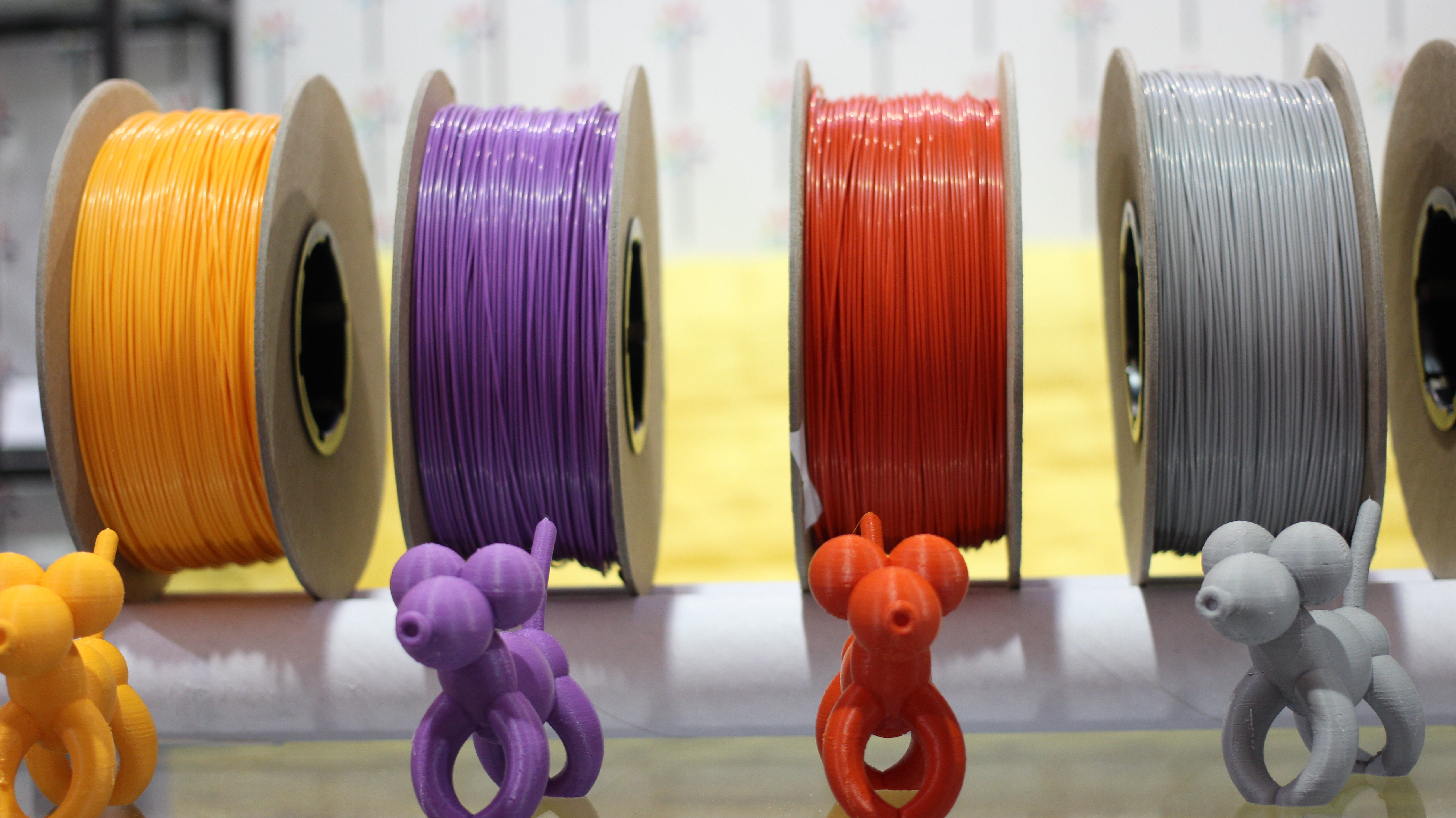
- PLA (Polylactic Acid): A biodegradable thermoplastic that is easy to print and suitable for general-purpose applications. Recommended printing temperature: 200-220°C.
- ABS (Acrylonitrile Butadiene Styrene): A strong and durable thermoplastic that is resistant to heat. Requires a heated bed. Recommended printing temperature: 230-250°C.
- PETG (Polyethylene Terephthalate Glycol): A versatile thermoplastic that combines the strength of ABS with the ease of printing of PLA. Recommended printing temperature: 220-250°C.
- TPU (Thermoplastic Polyurethane): A flexible thermoplastic that is used for printing flexible parts. Recommended printing temperature: 210-230°C.
- ASA (Acrylonitrile Styrene Acrylate): Similar to ABS but with better UV resistance, making it suitable for outdoor applications. Recommended printing temperature: 220-240°C.
The 3D Printing Process
Here's a step-by-step guide to the 3D printing process:
- Create or Download a 3D Model: Use CAD software to design your own model or download a pre-made model from online repositories.
- Prepare the 3D Model: Open the STL file in slicing software and configure the settings according to the filament and printer being used.
- Prepare the Printer: Level the print bed, load the filament, and preheat the nozzle and bed to the recommended temperatures.
- Start the Print: Upload the G-code file to the printer and start the printing process.
- Monitor the Print: Observe the printing process to ensure that everything is going smoothly.
- Remove the Print: Once the print is complete, carefully remove it from the build platform.
- Post-Process the Print (Optional): Remove support structures, sand the surface, and paint the print as needed.
Troubleshooting
Common 3D printing problems and solutions:
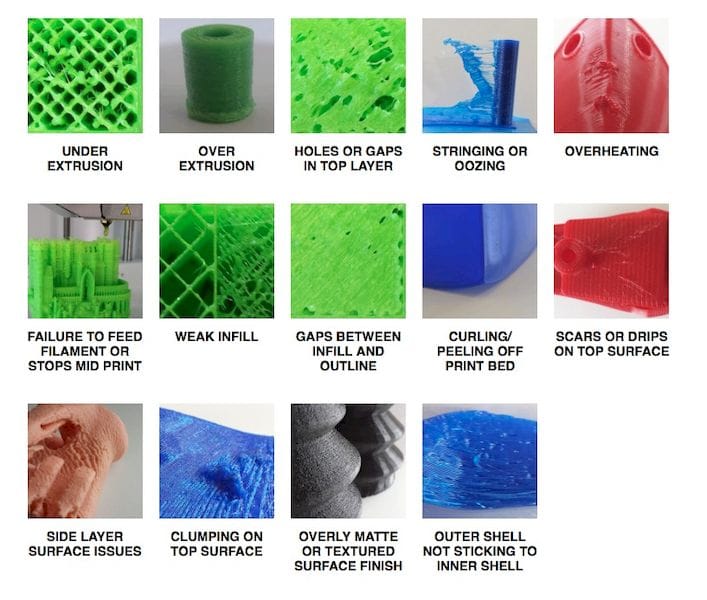
- Warping: Occurs when the print detaches from the build platform due to uneven cooling. Solution: Use a heated bed, apply adhesive to the build platform, or enclose the printer.
- Adhesion Issues: The print does not stick to the build platform. Solution: Level the print bed, clean the build platform, or adjust the nozzle height.
- Stringing: Thin strands of filament are left between parts of the print. Solution: Reduce the printing temperature, increase retraction settings, or dry the filament.
- Nozzle Clogging: The nozzle becomes blocked with filament. Solution: Clean the nozzle, increase the printing temperature, or replace the nozzle.
- Over/Under-Extrusion: Too much or too little filament is extruded. Solution: Calibrate the extruder, adjust the flow rate, or check the filament diameter.
Applications of 3D Printing
3D printing is used in a wide range of industries, including:
- Healthcare: Creating custom prosthetics, surgical guides, and medical models. See how Printie 3D serves the medical industry.
- Aerospace: Manufacturing lightweight and complex parts for aircraft.
- Automotive: Prototyping and manufacturing custom car parts. Learn about 3D printing in Automotive & Aerospace.
- Jewelry: Creating intricate jewelry designs and wax patterns for casting. Check out 3D printing solutions for jewelry designers.
- Education: Teaching students about design, engineering, and manufacturing.
- Architecture: Creating detailed architectural models.
Maintenance
Regular maintenance is essential for keeping your 3D printer in good working order:
- Clean the nozzle regularly to prevent clogging.
- Lubricate moving parts to ensure smooth operation.
- Check and tighten screws and bolts to prevent vibrations.
- Store filaments in a dry place to prevent moisture absorption.
- Calibrate the printer regularly to maintain accuracy.